|
The Expenses / Purchases List now includes filter controls that you can use to quickly find a group of purchases or a specific purchase. You can select purchases by Supplier, Date, and Pay Type.
The filter controls are similar to those used for other lists, such as Contacts, Horses and Invoices. You can use the filter from either the full-screen or mobile side of iForgeAhead.
Please see the screen shots below displaying the filter controls on both sides of iForgeAhead.
| Attachments: |
File comment: Using the Purchases filter on the full-screen side
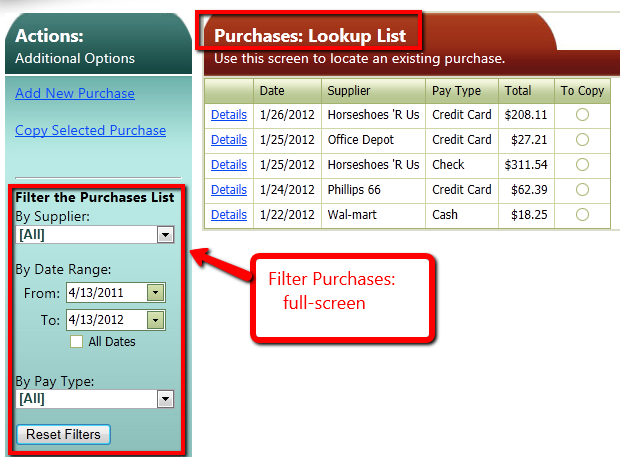
PurchasesFilter_Full.png [ 66.31 KiB | Viewed 14026 times ]
|
File comment: Accessing the Purchases filter on the mobile side
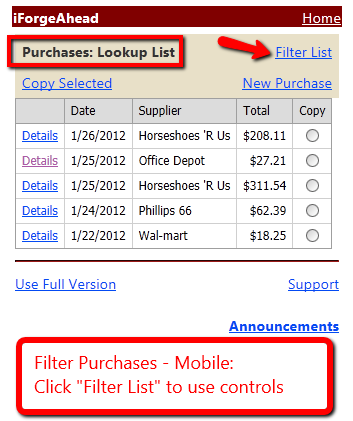
PurchasesFilter_Mobile1.png [ 33.51 KiB | Viewed 14026 times ]
|
File comment: Using the Purchases filter on the mobile side
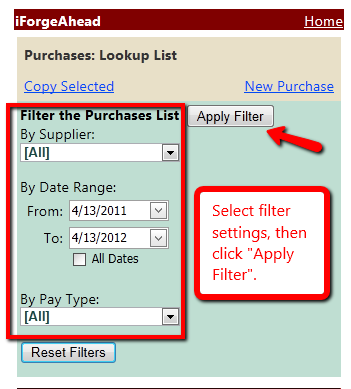
PurchasesFilter_Mobile2.png [ 27.9 KiB | Viewed 14026 times ]
|
_________________
Julie Schwalm
iForgeAhead
|


