|
iForgeAhead includes a new Invoice Format Setting : “Show Account Status”.
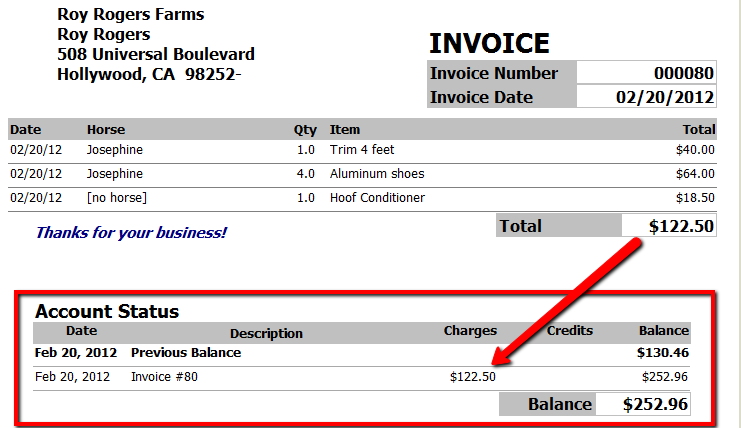
When this option is checked, the invoice document will include an extra section at the bottom that summarizes the client’s account and shows the current balance for the account (see screen shot below). This will be helpful in communicating exactly what the client owes; or if the invoice has been paid and there are no other outstanding invoices, the balance will show zero.
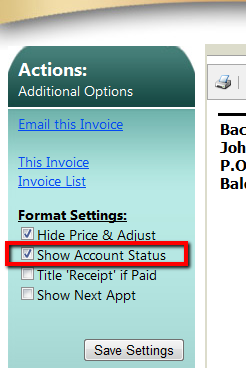
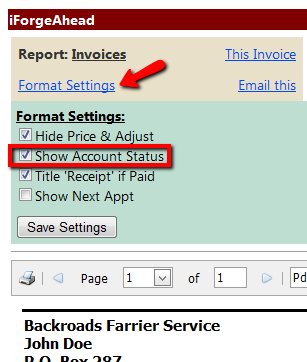
You can set this option when previewing an invoice - on either the mobile or full-screen side (see screen shot below).
Please Note: Even if the “Show Account Status” option is checked, the Account Status section will only be included if the client’s account balance is different from the amount of the invoice.
| Attachments: |
InvAcctStatus2.png [ 41.07 KiB | Viewed 13846 times ]
|
InvAcctStatus1.png [ 30.35 KiB | Viewed 13846 times ]
|
InvAcctStatusMobile.png [ 21.72 KiB | Viewed 13846 times ]
|
_________________
Julie Schwalm
iForgeAhead
|


